

Some designs show something while the page gets ready: a spinner, a bar, a name fading in. Until now that was fixed by the design. You got whatever loading screen it came with, or none.

A few designs in the catalog have always had something moving behind them: rain on one, drifting specks on another, a slow web of connected dots on a third.

Audio on an actor website splits into two things that want different treatment.

Your photographs have been served from a global delivery network for a while, which we wrote about in image hosting moves to a global CDN.

Sorting had drifted into four different behaviors. Photo categories, video categories, social links and other links were reordered with a pair of up and down arrows, one click per position.
Every photo you upload can carry a caption, and if you have not written one, a usable one is generated from what your account already knows.

An interactive reel is a reel cut into chapters, so somebody watching can jump to the scene they care about instead of sitting through four minutes to reach it.
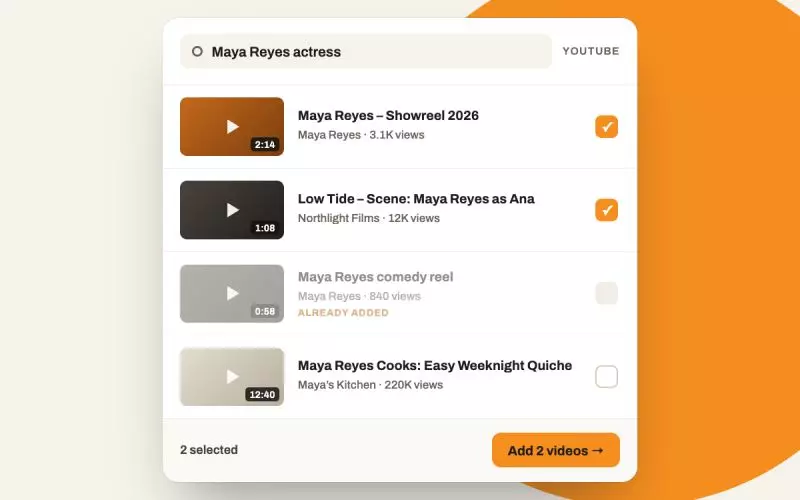
The Videos page only ever accepted a pasted address. So filling it meant leaving the admin, finding each video on YouTube, copying its address, coming back, pasting, saving, and doing that again for every clip.

Importing a track from SoundCloud onto your website sounds like it should be one step: ask for the file, receive the file.

Every design in the catalog is checked before it ships, and the check is deliberately the crude one: put it in front of a real browser, with a real account behind it, and see whether a complete page comes back.

Most actors already keep their headshots and their audio in a cloud folder, because that is where the photographer or the studio put them.

If you have audio on your account, it reaches your website. That is true on every design in the catalog, which matters more for some actors than others: for a voice actor the audio is not a supporting detail, it is the product.